![flogo.png]](https://support.thenational.academy/hs-fs/hubfs/Email/oak-template-august22/flogo.png?height=44&name=flogo.png)
Welcome to Oak. This guide gives you more information on:
What is Oak?
We’re here to help schools deliver a world-class curriculum for every pupil.
Our free, adaptable curriculum plans and resources evolve with education to give teachers and schools the latest tools to deliver inspiring lessons, save time and improve pupil outcomes.
Designed by subject and curriculum experts, our fully sequenced curriculum plans and teaching resources cover all national curriculum subjects from key stages 1 to 4. Whether you are designing a curriculum, creating new lessons, refreshing your approach, or solving a last-minute challenge, our resources give you a strong foundation that means you get there faster.
Getting started
To get started visit our homepage. From here you can easily access our curriculum plans, lesson planning and teaching resources and our AI tools.
Our website is accessible on most devices, including laptops, tablets and mobile. All of our planning and teaching resources are free to use.
✅Preparing for the revised national curriculum
We're updating our teaching resources and curriculum plans and sharing guidance to help schools prepare confidently and reduce workload ahead of the revised curriculum in September 2028, and the updated GCSEs beyond.
Sign up now to receive: 
- the latest updates
- expert guidance
- invitations to webinars
- free resources and helpful content.
Our fully sequenced curriculum plans for each national curriculum subject KS1-4, provide inspiration and a springboard for annual, termly and weekly planning for every teacher in your school.
Free to download for every subject and school phase, each plan provides a curriculum rationale, an outline of all topic units available and how many lessons are in each. To help you further, we’ve provided unit information on 'why this, why now'.
There is also a suggested sequenced order of lessons to support with your planning, as well as teaching resources for every lesson in the curriculum plans.
Explore our interactive curriculum plans for even more help with your planning.
Here you can:
- View the full sequence and lessons we have teaching resources for
- See an explainer of each curriculum, so you can understand the thinking, structure and focus behind the plan to inspire your own approach
- Download the plan, including a national curriculum alignment document explaining how our curriculum aligns to the national curriculum
- See how our threads weave their way through our curriculum so you can see common themes or topics running through units, years and key stages in the subject
- See the unit descriptions with a 'why this, why now' and 'prior knowledge requirements' to help you consider the sequence of your current planning
- Move easily from units into lessons to understand lesson outcomes, helping you connect curriculum intent with classroom delivery.
Go to our curricula page to find our about the principles that underpin our curricula.
For more information see our help article: A guide to our curriculum plans
Our teaching resources
We have thousands of free lesson planning and teaching resources which have been made to be easily adapted by you for use in your classroom.
Everything is designed by subject and curriculum experts as part of a sequenced curriculum, so you can clearly see how your lesson fits into the bigger picture. This helps you to save time planning your next topic, knowing you're building your pupils' knowledge step by step.
You can access these in a number of ways. From our homepage select your subject and school phase. Then use the buttons to filter by year group or thread (a common theme or topic that provides coherence as it weaves its way through the curriculum, and click into a unit to find more detail about that unit and the lessons within it.
You can also search by keyword or topic using the search box at the top right of the page.
Why not get started now with our lesson planning page. You can learn more about our resources and how to use them to support your lesson planning.
Each lesson is made up of similar resources:
- Lesson details - We’ve added the key learning points, keywords, common misconceptions and a teacher tip to help you plan and deliver the lesson.
- Prior knowledge starter quiz - Help your pupils retrieve or activate prior knowledge with our starter quizzes.
- Videos - Build your confidence tackling unfamiliar topics by observing experienced teachers delivering the lesson, or use the videos to support your pupils with homework and revision.
- Video and audio clips - Some subjects such as MFL, music and PE have video and/or audio clips to enhance explanations, support your own understanding and to create a richer learning experience in the classroom. See our help article: What are video and audio clips?.
- Lesson slides - The majority of our slide decks can be downloaded and edited. Use them as a foundation for your own lesson plans, and adapt them to make them your own.
Some of our PE lesson resources have a lesson guide instead of lesson slides. This guide is intended to be downloaded and printed so you can use it in lessons that don't take place in a classroom setting.
- Worksheets - Our worksheets help your pupils practise key lesson content, and help you plan for questions and tasks. Use them in the classroom, for homework and revision.
- Assessment exit quiz - Finish your lesson with our exit quizzes, designed to test your pupils’ knowledge recall and to help you to identify areas which require reteaching.
- Transcripts - These are available for every lesson video. These are useful for those who want to quickly skim to see what each lesson covers, without having to watch the whole video. Many teachers also use Oak lesson transcripts to help with scripting their own lessons.
- Additional material - You can view and download additional material to help you teach the lesson. Content can include information about the purpose of the lesson, materials needed, methods to use and risk assessment considerations.
Click the 'Create more with AI' button at the top of a lesson page to instantly generate, tailor and download teaching materials like glossaries, comprehension tasks and starter or exit quizzes.
For guidance on finding what you need, read our help article: How do I find lesson planning and teaching resources?
For more information about using our teaching resources see our help article: How do I use your teaching resources to plan and teach great lessons?
Downloading and sharing resources
Wherever copyright allows, which is on the vast majority of our lesson resources, you can also download the slides and any worksheets allowing you to edit and adapt them however you need to.
You are also able to share Oak all or part of a lesson with your pupils in a variety of ways.
Downloading full units
You can save yourself time by downloading all lessons in a unit sequence to use now or come back to later.
You'll see a Download unit button on any unit page of our teaching resources:
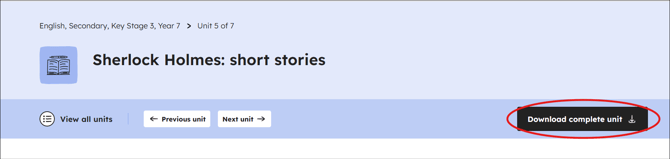
You'll be asked a few questions about what you use our resources for and then you'll be able to download whole units of resources. For more information read our help article: Downloading full units.
Did you know?
Signing in will also give you access to:
🤖Aila, our AI lesson assistant, where you can create lesson plans specifically tailored to your pupils in minutes using our AI tool. Read our help article: How to use Aila, our AI lesson assistant.
📚My library so you can save units and content you want to revisit quickly to access anytime, anywhere, from any device. See our help article: How do I use My library?
©️Copyrighted materials so you can access and download any resources we have made using copyrighted material. Find more information in our help article: Why we ask you to sign in to access certain resources and how this relates to copyright.
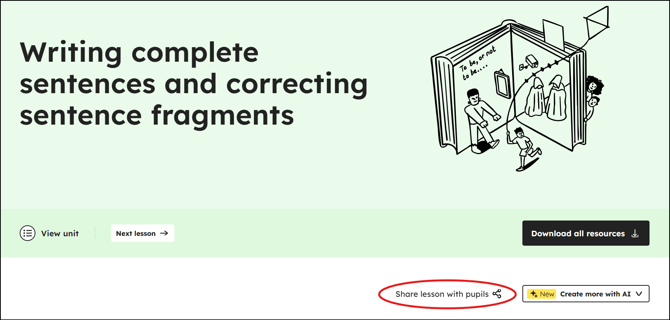
Want to share lesson activities such as quizzes and worksheets with your pupils? Click on the 'Share lesson with pupils' button on a lesson page to view the ‘pupil view’ of the lesson.
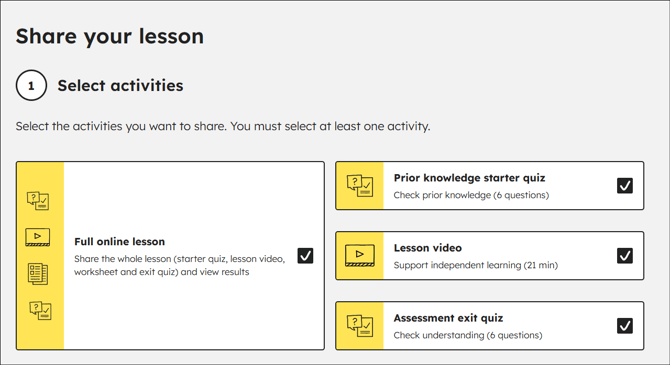
You can choose what you share, either the full set of activities (lesson video, worksheet and starter and exit quizzes) or individual activities, ensuring the learning is personalised and relevant.
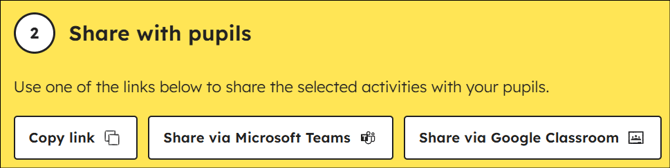
Once you have decided what to share you can share via:
- 'Copy link' to share directly with colleagues or with your classes
- 'Google Classroom' or 'Microsoft Teams' to post lesson resources directly to your VLE
Tracking pupil work
To help assess pupils progress, your class can share their results with you once they have completed a lesson. This means you can track pupils’ progress even if they’re completing it independently.
How it works:
- Pupils complete a lesson in our pupil area.
- The quizzes are automatically marked and pupils are shown a final score.
- Pupils can then share results via a link or print them out.
- Teachers are able to see a breakdown of the pupil's answers by question, attempts made, the final score, whether they downloaded the worksheet and how much of the video they watched.
See our help article: Using our pupil area.
Using My library
My library is your personal space on Oak to save and organise the content that matters most to you.
With my library, you can:
- Save units and content you want to revisit
- Quickly get to the lesson resources you use often
- Access anytime, anywhere – from any device.
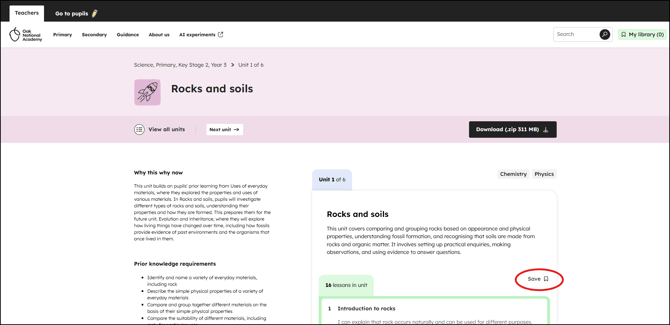
To add units to my library use the Save button on any unit page and follow the sign in process.
To access My library go to the header on any page and select the bookmark button.
Read more in our help article: How do I use My library?.
More ways to use our resources
Our resources are designed to be flexible, so you can use them in a variety of ways to support your teaching. Here are some of the other ways we've heard teachers are using Oak.
- Homework and revision - Teacher workloads are stretched far enough without spending hours creating topical homework, revision booklets and after-school sessions from scratch. For building skills and knowledge outside of the classroom, explore and share our lessons with your classes.
- Setting cover – Oak is the ace up your sleeve when it comes to setting cover. Our thousands of resources are there to take the pressure off, especially when there’s a requirement for a colleague or supply teacher to cover a subject or key stage that isn’t a specialism. Simply find and select a lesson and share the link.
- Supporting absent pupils - There are many reasons a pupil may be absent from lessons or from school. Our ready-made resources mean you can support absent pupils and you only have to plan your lessons once, no matter where your pupils are learning. Download resources for your in-class teaching, whilst sending the same lesson to any pupil at home via Google Classroom, Teams or any other platforms.
Our AI tools
Our AI tools are designed to help you create lesson resources efficiently, saving you valuable time to focus on bringing the lesson to life and supporting pupils.
All our tools draw on our high-quality curriculum resources, which have been designed by expert teachers and are national curriculum aligned.
- Use Aila, our AI lesson assistant to quickly adapt Oak lessons for your class and context or create something you need that you can’t find in our existing resources. Read our help article: How to use Aila, our AI lesson assistant for more help on getting started.
- Create teaching materials with AI to enhance your lessons further by helping you to create a range of teaching materials, including glossaries, comprehension tasks and quizzes. This can be accessed from Aila or look out for the 'Create more with AI' button at the top of a lesson page.
We're currently testing the Create teaching materials with AI feature and we'd love you to give us some feedback.
All the units and lessons you can see are also available for pupils in their own dedicated area.
You may want your class to use our pupil area for homework or revision, to support them if they are absent or for when there is disruption such as bad weather. Whatever the reason, we know pupils' needs are very different to the needs of a teacher, so we've designed this part of our website just for them.
It only takes seconds to select and send resources such as videos, worksheets and quizzes to your pupils to complete outside of the classroom. They’ll receive real-time feedback on their quiz answers too and can use a hint function if needed. Then you can see their progress with our easy results-sharing function.
Read more in our help article: Using our pupil area.
Accessibility
Accessibility is really important to us, so our lessons contain captions which can be switched on and off.
We've also started to add BSL into our primary videos. We currently have BSL in primary maths, history and science, with more subjects to come in 2026.
Each lesson is designed to be undertaken by children without detailed support of parents.
Lessons can be paused and tracked back to give children time to understand and complete tasks. Everything is accessible from the same website. And once they’ve finished a lesson, they can click back to your VLE and finish any other lessons for that day.
Find out more in our accessibility statement.
You can keep up to date by signing up for updates from us.